The National Career Service (NCS) portal at ncs.gov.in is the Government of India’s free job and career platform, run by the Ministry of Labour and Employment. In one place you can search government and private jobs, build a resume with AI, find job fairs near you, talk to a career counsellor and pick up new skills. Employers can post vacancies and search candidates, also free. Here is how it works, in simple English, and how to get the most out of it.
The short version
- NCS is the Government of India’s free job portal, launched in July 2015 by the Ministry of Labour and Employment.
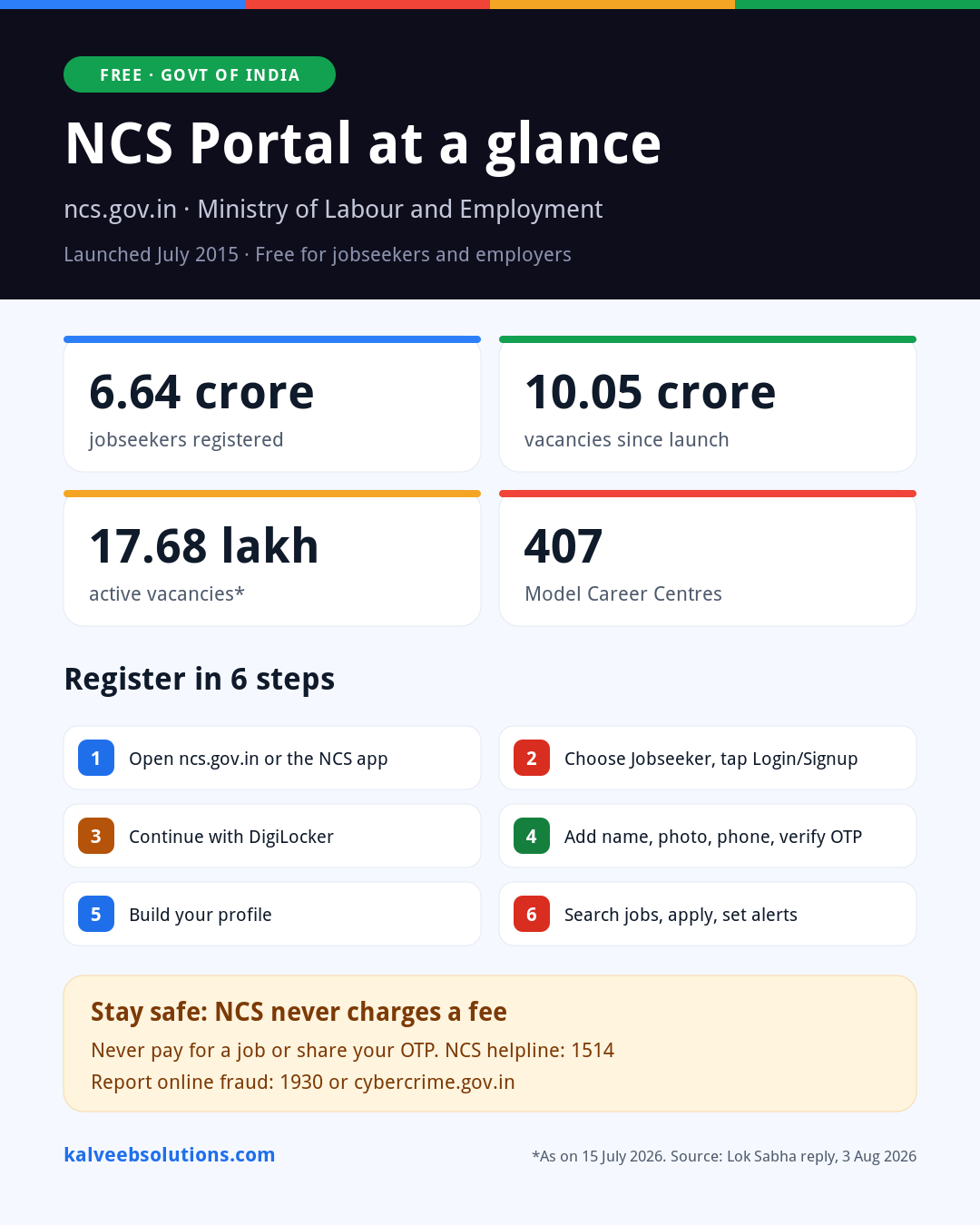
- Over 6.64 crore jobseekers have registered and more than 10.05 crore vacancies have been posted since launch.
- You sign up with DigiLocker, verify your phone by OTP and build your profile. It takes a few minutes.
- New AI tools: job matching, skill gap analysis, an AI interview coach and an AI resume builder, with support for Indian languages.
- Help is available online, on the NCS mobile app, at 407 Model Career Centres and on helpline 1514.
NCS in numbers
Active jobseekers vs active vacancies
As on 15 July 2026. Bars are drawn to scale.
That is roughly 16 active jobseekers for every active vacancy (our calculation). A complete, verified profile is how you stand out.
Source: Ministry of Labour and Employment, written reply in Lok Sabha, 3 August 2026. The live counters on ncs.gov.in change every day, so they may not match these figures.
What is the NCS portal, in plain words?
Think of NCS as a digital employment exchange. Earlier, you had to visit a district employment exchange in person to register. NCS brings that service online for the whole country and adds a lot more: private-sector jobs, job fairs, counselling and skill courses.
It connects four groups: jobseekers who want work, employers who want staff, career counsellors who guide people, and skill providers who train them. The portal has been rebuilt on a cloud platform with AI features, and it now works in multiple Indian languages through Bhashini, the government’s language technology.
What does NCS offer you?
Tap who you are to see what you get and what you need to start.
For jobseekers
Search and apply for jobs across India, in the government and private sector.
- Job search by location, sector and qualification
- Government, private, international and internship listings
- Online and offline job fair details
- AI job matching and personalised recommendations
- A DigiLocker account (Aadhaar-linked)
- A working mobile number for OTP
- Your education and work details
For students and freshers
Not sure what to do after school or college? NCS helps you choose a direction.
- Career counselling with trained counsellors
- Career information in many languages
- Personalised online mentoring programmes
- Employability assessment and skill course links
- Basic registration on NCS
- Your marks, interests and preferred location
For employers and MSMEs
Post vacancies and find candidates without paying a job board.
- Free job posting and candidate search
- Take part in job fairs
- Reach jobseekers in your district or across India
- A registration number (Labour Identification Number, MCA, Udyam/MSME, Economic Census or similar)
- Organisation PAN and official email
- Aadhaar or PAN of the person registering, and a mobile number
Special categories
Dedicated job listings for people who need them most.
- Jobs for persons with disabilities
- Jobs for ex-servicemen
- International job listings
- Internships
- The same jobseeker registration
- Relevant certificates, such as a disability certificate or discharge book
Find your starting point
Pick your goal and we’ll show the three NCS steps that matter most for you.
What do you want from NCS?
Nothing is stored or sent anywhere.
Choose a goal above
Your 3-step plan will appear here.
How to register on NCS: step by step
- Go to ncs.gov.inUse the official website, or install the “National Career Service (NCS)” app from Google Play or the App Store.
- Select “Jobseeker” and tap Login/SignupYou will find it in the top menu.
- Continue with DigiLockerSign in to DigiLocker and allow NCS to read your basic details. This saves typing and verifies who you are.
- Add your name, photo, phone and emailEnter the OTP sent to your phone to verify your number.
- Build your profileAdd education, skills, experience and the kind of job and location you want. You can skip this, but a complete profile gets far better matches.
- Search, apply and set alertsUse filters for government, private, international or internship jobs, and check upcoming job fairs.
Is your NCS profile ready? Check it here
Employers and the AI matching engine both rely on your profile. Tick what you have done.
NCS profile checklist
0 of 8 done
The new AI tools on NCS
AI job matching
Suggests jobs that fit your skills, education and location, instead of you scrolling through thousands.
AI skill gap analysis
Shows which skills you are missing for the jobs you want, so you know what to learn next.
AI interview coach
Lets you practise interview questions before the real thing.
AI resume builder
Creates a free resume that is easy for recruiters and their software to read.
Your language
Multilingual support through Bhashini, so you can use NCS in the language you are comfortable with.
Mobile app
Search, apply and get alerts on your phone with the official NCS app.
Who is connected to NCS?
NCS is not working alone. It is linked with other government platforms and recruiters, and has signed more than 40 MoUs with public and private organisations for jobs, skills, counselling and job fairs. 31 States and UTs are integrated with it.
Recruitment bodies
Government platforms
Private partners named by the Ministry
Government recruitment notices still follow their own rules. When an NCS listing sends you to UPSC, SSC or an RRB website, apply there before the official last date. If you are preparing for one of these exams, see our UPSC EPFO APFC 2026 course on English To Win and the free daily quizzes on English To Win.
Prefer help in person? Model Career Centres
Under the NCS project, 407 Model Career Centres have been approved, and 370 of them are upgraded employment exchanges. They offer career counselling, help with registration, employer outreach and local job fairs. Ask at your district employment exchange, or use the Career Centre option on ncs.gov.in to find the nearest one.
Stay safe from fake job offers
NCS itself warns that some websites, employers and individuals falsely claim to be linked with NCS or misuse its logo. Remember these rules:
- NCS services are free. Never pay a “registration fee”, “security deposit” or “training fee” to get a job through NCS.
- Do not share your OTP, DigiLocker PIN or bank details with anyone who calls about a job.
- Be careful with offers that promise a government job without an exam.
- Check the website address is ncs.gov.in before you log in.
For employers: hire through NCS for free
If you run a shop, factory, clinic or any small business, NCS is a no-cost way to reach local candidates. Register as an employer, post your vacancy with the salary and location, and search profiles that match. You can also take part in job fairs in your district.
- A registration number: Labour Identification Number (LIN), MCA, Udyam/MSME, Economic Census or another valid one
- Organisation PAN and an official email address
- Aadhaar or PAN of the person registering, and a mobile number
Hiring is also the moment your PF and ESIC duties begin. Our monthly compliance calendar and the new PF wage ceiling guide explain what to do after a new joiner starts.
Frequently asked questions
Is the NCS portal free?
Yes. Registration, job search, applications, counselling and job fair information on NCS are free for jobseekers and employers. Anyone asking for money in the name of NCS is not genuine.
Who runs the National Career Service?
The Directorate General of Employment under the Ministry of Labour and Employment, Government of India. The portal was launched in July 2015.
How do I register on NCS?
Go to ncs.gov.in, choose Jobseeker, tap Login/Signup and continue with DigiLocker. Add your name, photo, phone and email, verify the OTP and build your profile.
Do I need Aadhaar to register?
Registration now runs through DigiLocker, which is linked to your Aadhaar. If you face trouble, call the helpline 1514 or visit a Model Career Centre for help.
Are there government jobs on NCS?
Yes. NCS lists government and private jobs and is integrated with UPSC, SSC, Railway Recruitment Boards and ASRB. Always complete the application on the official recruiting website when the listing sends you there.
Can I find jobs abroad on NCS?
NCS has an international jobs section. Check every overseas offer carefully and never pay an agent who claims to be from NCS.
Is there an NCS mobile app?
Yes. Search for “National Career Service (NCS)” on Google Play or the App Store and check that it is the official app.
What is the NCS helpline number?
The toll-free NCS helpline is 1514. You can also email support.ncs@gov.in.
Hiring for your business? Let’s set it up right
We can help you register as an employer on NCS, write a clear job post, and get PF, ESIC and payroll ready for your new staff from day one.
Related reads: How to find government jobs on NCS · UPSC EPFO APFC 2026 course on English To Win · Free daily quizzes on English To Win · NAPS and NATS apprentices: no ESI or EPF
Sources
- National Career Service portal (services, helpline 1514, fraud warning)
- NCS: Jobseeker registration flowchart
- DD India: NCS portal records 17.68 lakh active vacancies (Lok Sabha reply, 3 August 2026)
- ANI: NCS portal mobilises over 10.05 crore vacancies since inception
- NCS Overview and its Requirements (registration requirements)
- Business Standard: NCS launch date and monthly vacancy trends
This article is general information based on official sources as of 28 October 2026. Kalvee Business Solutions is not part of NCS or the Ministry of Labour and Employment. Features and figures on the portal change often, so check ncs.gov.in for the latest.

Need a quick answer? Message us on WhatsApp